
Fast answer
What emergency-preparedness evidence should skilled nursing administrators keep current?
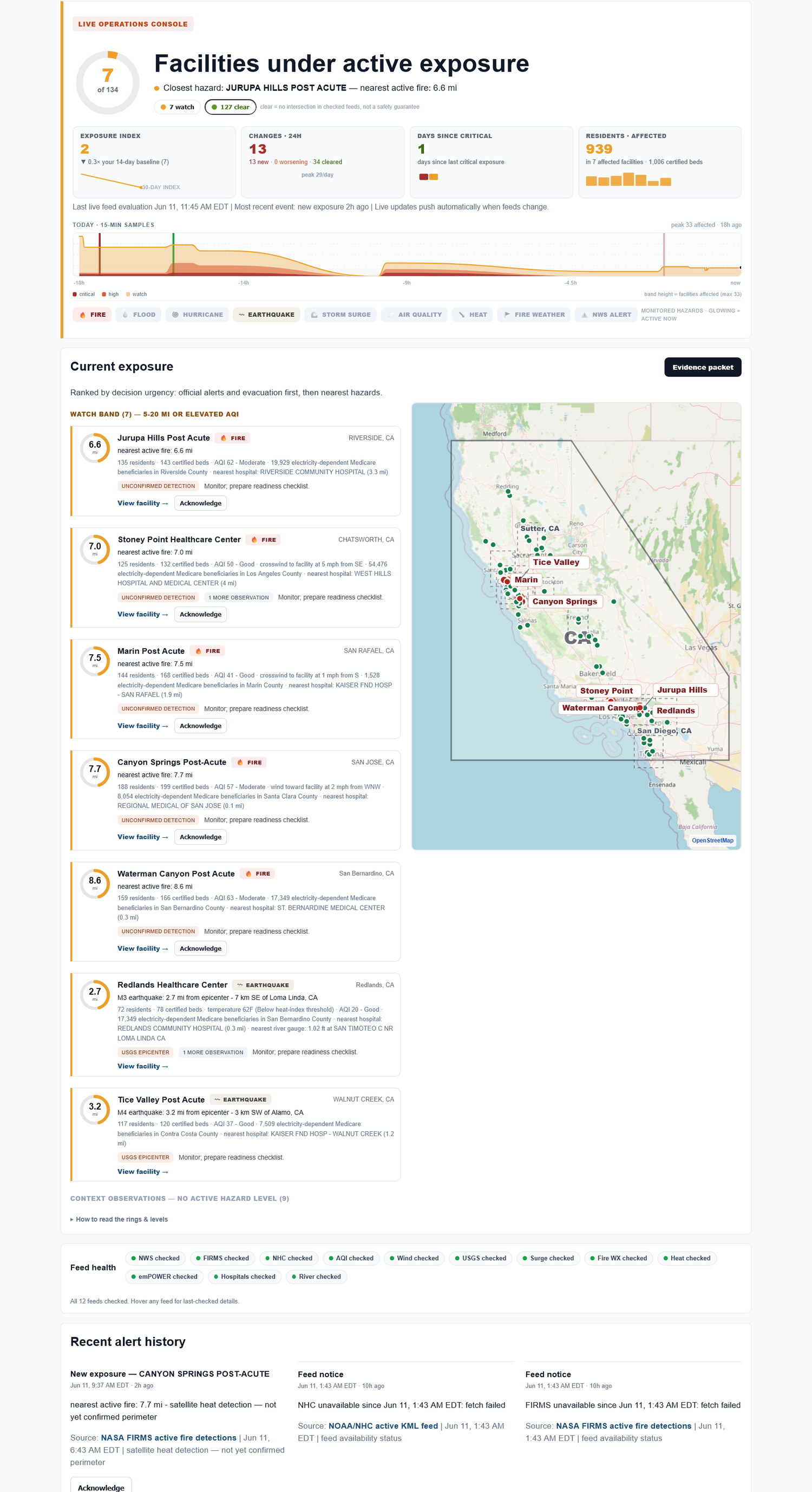
Administrators need a fast portfolio view, a facility-level timeline, and a record that compliance and regional leaders can review. Exposure Watch keeps the live exposure picture connected to source-cited history.
The administrator gets both questions. What is happening now, and what will we be able to show later?
Why administrators need more than an alert inbox
An alert inbox tells you something happened. It does not always tell you which building should be first, what changed, or whether the concern cleared.
The administrator needs a practical view: today's exposure and tomorrow's documentation in the same place.
Administrator exposure review checklist
Use this short worksheet to capture what the team needs before the formal review, not as a substitute for the official program.
| Element | How to use it |
|---|---|
| Current attention list | Identify which buildings may need review now. |
| Evidence owner | Name who will save the source-cited trail for later review. |
| Leadership question | Prepare the record needed for regional, board, or compliance follow-up. |
Download worksheet This static worksheet is a practical review aid, not a certification or official filing tool.
How Exposure Watch helps
Exposure Watch shows monitored facility exposure and preserves the source-cited trail for review. It helps administrators coordinate attention without claiming to run operations or make regulatory conclusions.
The evidence trail to keep on every page
| Facility | Hazard | Source | Status / distance | First seen | Last checked | Export |
|---|---|---|---|---|---|---|
| Facility A | Wildfire smoke | Authoritative, source-cited alert | Nearby / active | timestamp | timestamp | Export |
| Facility B | Power shutoff | Authoritative, source-cited notice | Possible impact | timestamp | timestamp | Export |
| Facility C | Flood | Authoritative, source-cited alert | Watch area | timestamp | timestamp | Export |
Built automatically from the same live checks - no extra binder work.
What Exposure Watch does not do
Exposure Watch does not replace your emergency-preparedness program, make compliance guarantees, file regulatory reports, run incident command, or tell staff what to do in the moment. It helps your team keep the facility-level external-hazard picture and evidence trail current.
FAQ
What does an administrator see first in Exposure Watch?
The practical view is which monitored facilities may need attention now, followed by the saved source-cited history for later review.
How does this help an administrator during regional calls?
It gives the administrator a facility-level record of source, status, timing, and change history instead of asking them to interpret scattered alerts live.
Does Exposure Watch collect PHI?
No. Exposure Watch is facility-level external-hazard monitoring. Do not enter resident names, patient records, medical details, or clinical data.
Does Exposure Watch tell staff what to do during an incident?
No. It surfaces facility exposure and preserves the record. Your team keeps responsibility for operations, clinical judgment, reporting, and emergency-preparedness decisions.